DOCUMENTATION / WTC
Under OpenClaw
Work across repositories from one conversation, with worktrees and publishing managed by the gateway.
Tunnel guidance and walkthrough visuals follow v0.2.6; older workflow sections keep their stated baselines. Confirm your installed behavior with
taba docs instructions/openclaw.md.
What the plugin adds
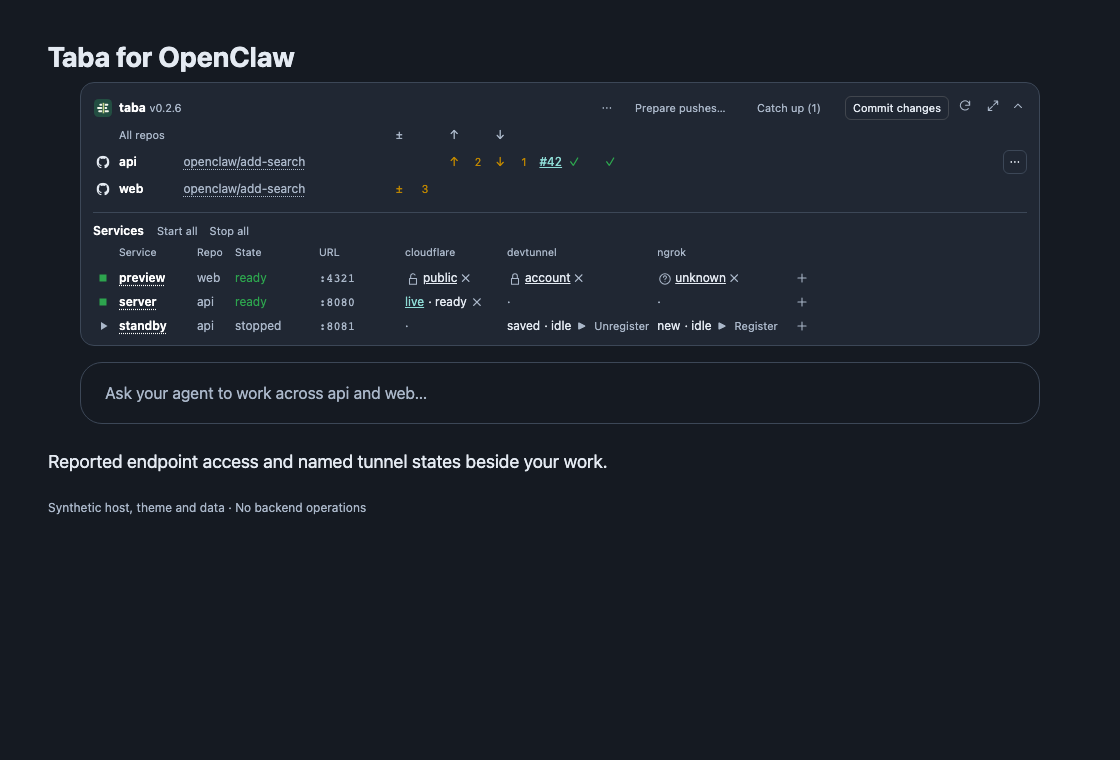
The plugin adds a collection card above the message box and a Collection panel (⤢) so you can see changes across repositories without visiting each owner session.
| Column or control | What it tells you or does |
|---|---|
| ±N / ± | Review and commit intended changes for one repository or all eligible repositories via the conversation (publication is separate) |
| ↑ | Commits waiting to push; click to start publication confirmation |
| ↓ | Commits behind base; click to catch up |
| PR | Open the repository’s pull request |
| C / M / R | CI checks, mergeability, and review status (hover for details) |
| ▶ / ■ / ↻ | Start, stop, or restart a service |
| + beside a service | Choose a portal or tunnel (availability depends on gateway configuration) |
| ⤢ | Open the Collection panel (task context, PR details, Add repository) |
A service’s local port is on the gateway, not necessarily your laptop; share it through a portal or tunnel (not every endpoint is public). Both views refresh while open. Switch back to the standard composer with Customize UI → Built-in.
Watch the card-to-panel walkthrough (about 9 seconds)
Transcript: the header shows running Taba v0.2.6. The card expands to show api and web, repository changes and a pull request. Ready preview endpoints report public, account and unknown access. A ready server has an active named link; a stopped standby service shows a retained registration and an unregistered entry with lifecycle controls. Selecting ⤢ opens the Collection panel. Synthetic host, theme and data; no audio or backend operations. No tunnel lifecycle controls are clicked.
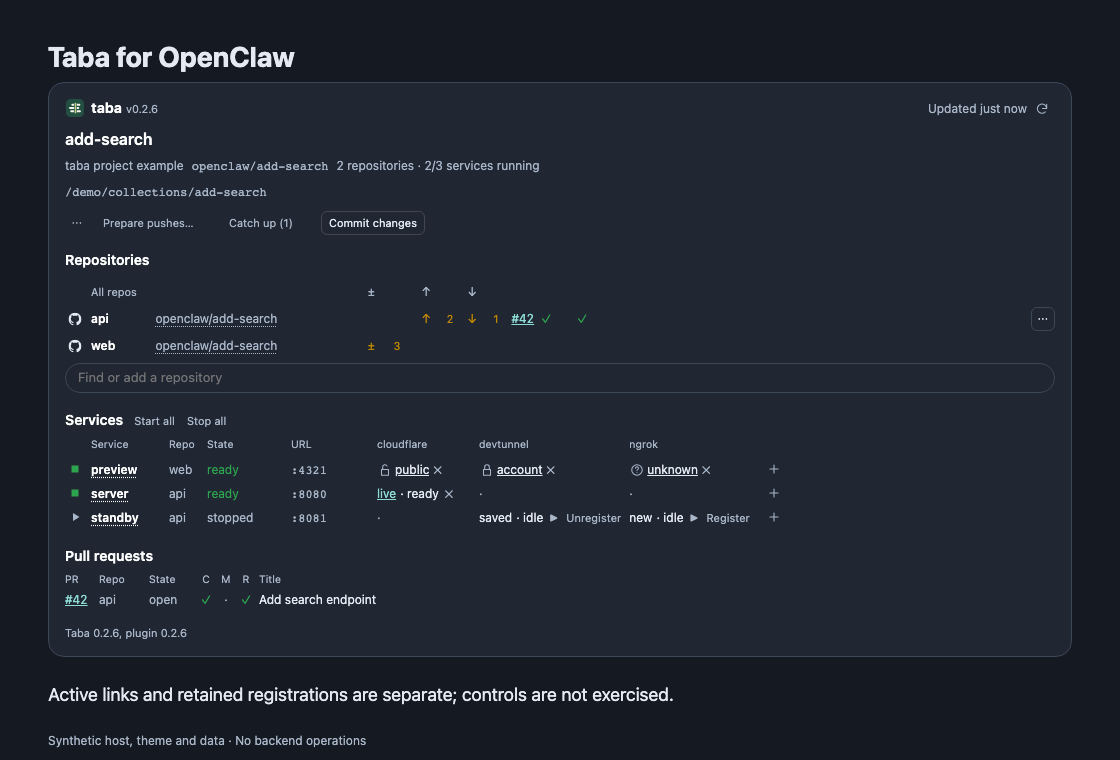
View the Collection panel screenshot. These visuals come from the published v0.2.6 source renderer using synthetic data (pinned separately from the v0.1.51 baseline), not live backend or tunnel operations; gateway styling and your installed version may differ.
Running version and observations in v0.2.6
Card and sidebar headers show the running gateway CLI version beside the taba mark (independent of the harness pin or a newer binary). Hover for both CLI and loaded plugin builds; narrow cards keep the logo and version. If builds disagree after an upgrade, reinstall the bundled plugin and reload open tabs.
Click or keyboard-activate a card diagnostic to copy its full text (or use the manual-copy field if clipboard access fails); Activity opens full details. Repeated manual Refresh clicks across card and panel share one active read and activity entry without adding force-refresh admission or faster polling. Post-action reads still fetch fresh status; missing or cancelled reads report failure.
Tunnel choices show a solid keyboard focus ring in light and dark themes. Service addresses without a port use their scheme’s default (HTTP 80, HTTPS 443); explicit nondefault ports stay distinct. Provider availability badges distinguish missing, unusable, and unknown executables on the gateway PATH without verifying authentication, reachability, or helper/socket capability. See the v0.2.6 integration contract.
Reported access and named tunnels
Under the tunnel controls contract, neutral endpoint links carry access glyphs: open lock for reported public access, closed lock for reported tailnet/account/protected access, and question mark for unknown access. Health errors are separate; a lock, provider name, or HTTPS URL is not proof of private enforcement. Named entries show their own state and lifecycle controls without access glyphs.
Named entries separate registration from active serving, offering start, register, stop, unregister, and reconcile via the CLI policy and ownership journal. Start/register approval binds to the current desired definition hash, so edits require renewed approval. Stopping retains stable registration and records start-off for the collection.
+ beside a service offers an existing gateway portal and provider setup guidance. Setup explains receiving-local configuration and explicit credentials or an authorized socket; it never installs software, logs in, allocates resources, sends agent tasks, or grants writes to project defaults. Microsoft Dev Tunnel hosting requires an existing Node22+ runtime and bundled helper; other providers and pure reads do not. Portal open/close routes are separate from named-provider policy. Status reads never query providers or run hooks; inspect uncertain outcomes rather than retrying blindly. See Services and previews for consent, lifecycle, and cleanup limits.
Set up or diagnose the integration
On the gateway host, install the CLI release and matching plugin:
wtc openclaw install
wtc doctor --openclaw
wtc openclaw install changes the gateway’s plugin configuration and reloads the plugin (an administrator step, not per-task). The main agent skill is taba (wtc is a compatibility alias); existing skill settings and plugin/configuration IDs keep their wtc keys.
The plugin ships inside the CLI. After upgrading the CLI, reinstall the plugin and reload open Control UI tabs (openclaw plugins update does not update this path-installed plugin). On image-managed gateways, rebuild the image instead of installing into a running container.
The gateway needs Git and gh; agents need collection instructions in workspace AGENTS.md (see the upstream setup guide for prerequisites, image setup, and sandbox configuration). For personal publishing, connect Settings → Profile → GitHub connections → For me (separate from the agent CLI’s shared account). The first ↑ prepares a push; confirm ↑ identifies the account and confirms the push. Bitbucket requires its own integration and login.
If the card is missing, verify the conversation has a collection, run wtc doctor --openclaw, check that the plugin composer is selected, and reload the browser after installation. For a CLI/plugin version mismatch, reinstall the plugin bundled with the intended CLI.
One conversation, many repositories
Ask your agent to add repositories to a named collection rather than opening a conversation per repository. Each repository gets a managed worktree on openclaw/<name>, held by a hidden owner session, and your conversation works through links in the collection folder.
Add a repository
The agent starts with:
wtc add-repo your-org/api --worktree fix-logintaba checks the request and prints a JSON plan without creating the worktree. Execute the tool intent with its exact arguments and named actor.
If the gateway has not cloned the repository, add it via Add repository in the Collection panel and retry.
Never run wtc init or wtc new under OpenClaw; the gateway must own every worktree it manages and publishes.
Confirm the collection
wtc status fix-loginShows the collection folder, repositories, branches, pull requests, and services. Work from the repository links in that folder. A pull request in another collection does not belong here, even if this conversation previously worked there.
Projects and parallel workers
A wtc project is a named set of repositories backed by a harness. Run wtc projects to match your task to a project before adding repositories; names resolve through its registry and taba adds the harness worktree too. Read its AGENTS.md before editing.
Each conversation belongs to one project. Pass --project <name> when prompted, or --project none for an ad-hoc collection. For an unregistered repository, pass --ad-hoc, register it first, or start another collection. If it belongs to another project, use a new conversation for that project unless explicitly adding it ad hoc.
Before a collection exists, the card can suggest a project by word-matching unsent drafts locally. Sent messages can optionally use a decision model (when configured, the OpenAI Decisions integration sends them to OpenAI); read the upstream gateway guide before enabling it.
Parallel work: check your installed version
The v0.1.51 baseline used --worker collections, now deprecated in the current reviewed source: put each separate implementation task in its own conversation and collection. Read-only reviewers can share the existing checkout. Check your release with wtc docs instructions/openclaw.md.
A child with an existing worktree appears as a sub-session under its repository: ↑ merges it into the collection checkout (wtc catch-up --from <branch> in the collection worktree), ↓ catches it up from that checkout, and ✕ discards it after confirmation. Review changes first; these controls do not publish.
Publish through the owner
The agent runs wtc publish --title "..." --body-file pr-description.md to check readiness and save the proposed PR title and description locally without committing or pushing. Push with ↑ in the collection card under your account after confirmation. The agent only asks the repository’s owner session to execute the publication plan when explicitly told to publish.
taba checks for unmanaged worktrees, unfinished merges, rewritten published history, and pending credential-like files. Review the pending file list before publishing: the gateway publishes all pending work in that worktree.
Committing saves changes locally; pushing sends them to the forge branch, updating its open PR or creating a draft PR if none exists. PR titles and descriptions stay separate from commits and may need updates as scope changes.
On GitHub, the gateway can commit pending files while preparing publication; never run git push yourself in a GitHub-managed worktree. On Bitbucket, the gateway publishes existing commits and leaves uncommitted files local. People merge.
Publication and tracking in v0.2.4
The published plugin reports whether a push created a draft PR or updated an existing one (a URL-only result does not claim a new PR). Proposed PR text offers a formatted collapsible preview and an unchanged Source view; raw HTML stays literal and images render as links so previewing never fetches remote images.
Successful publication records the PR and captured branch in collection tracking. Tracking pending means metadata still needs attention; refreshing retries tracking without pushing again. If a receipt fails to save, keep the returned PR URL and ask the owning conversation to inspect tracking. Inspect ambiguous publisher responses before retrying a push.
Review PR text asks the conversation to compare the title and description against the full current diff while keeping useful human edits. It only proposes changes; it does not edit remote PR text or request a code review.
Local changes and pending requests in v0.2.4
The fact controls keep cells stationary while hovered, pending, or briefly showing success. Commit handoffs stay pending until progress appears, partial commits keep unresolved work visible, and pending cells open the Action log. After an unconfirmed result, inspect the owning conversation before clicking I checked: request has finished, which releases the browser reservation without cancelling, verifying, or retrying work. Ask agent for help sends a diagnostic request without retrying.
Group Catch up highlights eligible rows on hover or focus. Gateway base catch-up snapshots staged, unstaged, and untracked edits into a pinned recovery copy, then restores staging. An unfinished operation, unsafe incoming path, or unverified restoration blocks continuation; keep the backup and follow the published recovery procedure instead of blindly retrying or discarding it.
Catch up without rewriting history
Run wtc catch-up in the repository’s worktree to merge its destination branch without rebasing or pushing. Resolve conflicts before publishing again, and never rebase or amend published commits.
GitHub PR events (checks, reviews, conflicts, merges) can wake the driving conversation; after a merge, catch up and verify rather than treating a status event as proof of shipment. Administrators can set pullRequestEvents: wake (immediate turns, default), queue (next turn), or off, with a default five-minute background poll.
In a sandbox, in-place catch-up requires the gateway’s read-only git service: resolve merge conflicts and run wtc catch-up --continue. Without it, catch up from the repository owner outside the sandbox. Never put forge credentials in a sandbox.
Next actions in v0.1.60
From v0.1.60, taba adds a Next actions section to the card and panel naming the next step, its reason, and the required approver. Clicking rechecks status before running catch-up or asking the conversation for the right skill. Push keeps personal-account confirmation; merge opens the PR for you to merge.
Commit changes asks the conversation to review and commit pending files before publication. The expanded card shows the full latest result, and refused publications surface as errors instead of muted status messages.
When a completed GitHub branch returns to the tip, its PR moves to the pull request list. Another publication round still needs a fresh managed worktree and owner; returning to the tip does not rebind the old owner. See the v0.1.60 gateway contract.
Keep a preview with the collection
Register a repository’s foreground development command from its collection worktree:
wtc svc add web --port-env PORT -- npm run dev
wtc svc
The command must listen on PORT (wrap it if it needs a CLI port flag). Service status appears in the collection; tunnels remain opt-in. See Services and previews for prerequisites, ports, and shutdown.
Compact next steps (v0.1.62)
Included in v0.1.62; see the released compact-controls contract.
The card uses dense repository rows without column headers. At normal widths, name, branch, changes, PR, and next action sit in fixed columns with the top action aligned above row actions; small outlined actions show hover/focus feedback. Collapsed to one line, the top-bar action stays available and ⋯ opens alternatives and mixed selections. Catch-up runs locally on first click; on an observed open PR, Update PR / Push prepares publication with personal confirmation (the local collection CLI already pushes merges to open or draft PR branches).
Baseline rows show at main (or the configured base); hover text distinguishes an untouched task branch from detached HEAD without implying the checkout owns main.
Each row shows its current PR, muted number links for other active PRs, and completed PRs as a 3 archived PRs button opening the full list in the taba sidebar. During a batch, rows show one phase and the top bar shows progress; completion controls such as Caught up 2 open the sidebar Action log (shared across views of that collection in the browser session, not persisted across reloads). In the Collection sidebar, action controls sit below collection details, and Services precedes Action log with matching heading emphasis.
For mixed selections, pick repositories or click Select suggested, then Run selected (Done choosing or finishing dispatch closes the chooser). Dispatch rechecks exact selected targets so new repositories cannot join mid-selection. Clean catch-up runs deterministically; if fetch finds conflicts, resolution is rechecked before handing off to the named catch-up skill. Other author tasks group into one pending handoff until completed.
Publication keeps per-repository personal confirmation. Cancel queued stops remaining dispatches without undoing active work, and reloading does not auto-resume a batch. Unchanged handoffs stay disabled until facts change; check the conversation before using Allow retry.
Check PR progress asks the conversation to inspect current reviews and merge requirements. Independent gateway review execution stays disabled until the shared review adapter exists (local status can hand off the existing independent-review skill); automatic follow-through and shared review slots are future work.
The status TUI keeps its status columns and adds a compact next-step hint. Press n to choose actions, Right for an alternative, then Enter for one repository, or Space (or s for visible suggestions) followed by Enter for a selection. Enter runs catch-up and local commands directly in wtc; publication selections preview first. Press c to cancel queued dispatches, or x to permit an explicit retry after checking the author conversation. Judgment steps go to the owning collection’s single idle author pane labelled agent (never a focused reviewer or shell), with a receipt naming collection, agent, and pane. Busy or ambiguous destinations show Not sent with a handover instruction; multi-author destination selection is future work.